Logo
Submit a request Sign in

What do you need help with?

  1. Support
  2. Filter
  3. Getting Started

Filter - How do I find my SmartPAC URL?

Securly Admin
Updated September 04, 2025 14:03

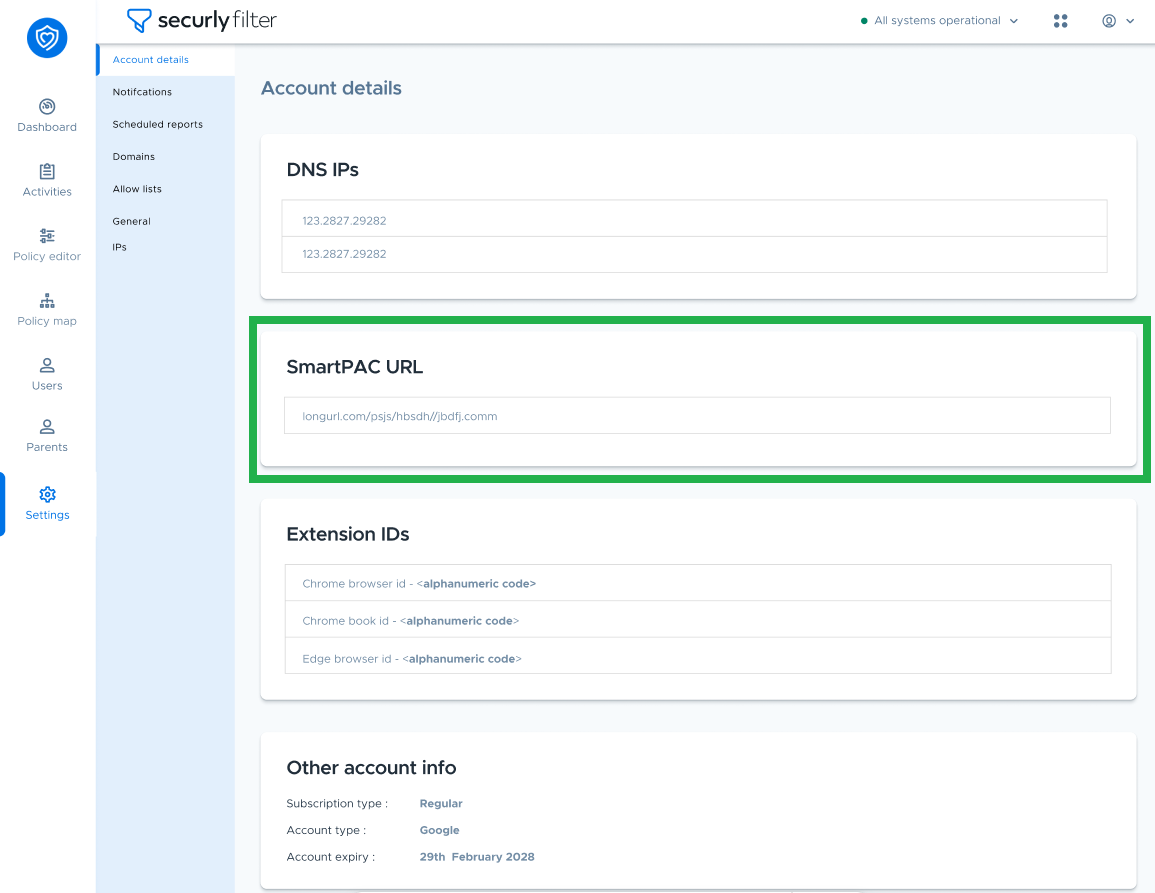
To check your SmartPAC URL, navigate to Settings > Account Details.


Was this article helpful?
1 out of 4 found this helpful
Have more questions?
Submit a request

Comments

0 comments

Article is closed for comments.

Articles in this section

  • Filter - Enabling Enhanced DNS Bypass Protection for Chromebooks
  • Filter - How does Securly scan keywords?
  • Filter - Securly Filtering - Product Briefs
  • Filter - Securly Filtering - Solutions Comparison and Compatibility
  • Filter - How can I help Securly with testing SmartPAC?
  • Filter - How can I see what cluster I am on?
  • Filter - How do I check the expiry date of my Filter account?
  • Filter - How do I enable Verbose logging?
  • Filter - How do I find my DNS IPs in Filter?
  • Filter - How do I find my SmartPAC URL?
See more

© Support

Solutions

  • Securly Platform
  • Student Safety
  • Student Wellness
  • Student Engagement
  • Technology

Company

  • About
  • Contact
  • Partners
  • Careers
  • Trust & safety

Products

  • Filter
  • Aware
  • On-Call
  • Classroom
  • MDM
  • Home
  • Reveal
  • Rhithm
  • Pass
  • Flex
  • Discern
  • AI Chat

Resources

  • Securly support
  • Home support
  • Case studies
  • Product briefs
  • Live events & webinars
  • Blog
  • Lookup tool

Contact us

  • School:
  • US: 1 (855) 732-8759
  • UK Support: +44 808 164 9773
  • UK Sales: +44 141 343 8322
  • sales@securly.com
  • support@securly.com
  • Parents:
  • homesupport@securly.com

Stay connected

  • © Securly, Inc. All rights reserved.
  • Privacy Policies
  • GDPR
  • COPPA
  • Terms of service